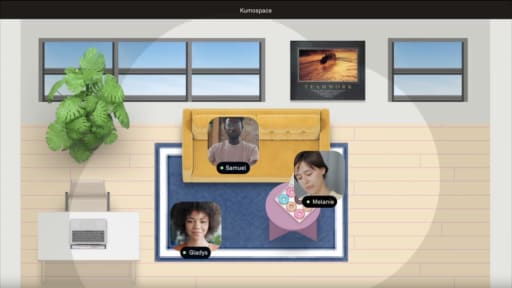
Illustration of remote worker in a video conference with multiple floating participant windows, representing signs of video call fatigue.

Video Call Fatigue Signs to Watch on Remote Teams

By Brett Martin •

Video call fatigue signs show up at team level before anyone names them: energy that tracks the calendar rather than the work, cameras going dark on internal calls, and follow-through that slips on heavy meeting days. The usual cause is meetings stacked with no recovery time, plus the real effort of holding eye contact and reading faces on a flat grid.

Video call fatigue builds quietly. A team that looks equally drained after four routine standups as after a high-stakes client pitch has a meeting-design problem, not a resilience problem.

Key Takeaways

  • The earliest sign is a gap: energy holds up for client-facing calls but crashes after strings of routine internal video meetings, which points to the format itself rather than the work.
  • The most common root cause is too many meetings stacked with no recovery time, combined with the real cognitive load of sustained eye contact, constant self-view, and reading facial expressions on a flat grid.
  • The fixes that work are shorter defaults, buffer time between calls, and making video optional where phone or chat would do; the responses that backfire are mandatory cameras, more check-ins, and treating it as a personal resilience problem.

What video call fatigue means on a remote team

Video call fatigue, sometimes called Zoom fatigue, describes a pattern where routine video meetings leave people more drained than the actual work they meet about. It isn't a clinical label; it's a team-wide drag on energy, focus, and follow-through that tracks with call volume rather than project difficulty.

Normal tiredness after a big product launch, an intense workshop, or a quarterly crunch is different, since that kind of fatigue tracks with the stakes and scope of the work. Video call fatigue tracks with the calendar instead: if a team seems equally spent after four ordinary standups as after a major client pitch, the meeting format itself is likely the problem. A single heavy week or product release can temporarily mimic the pattern without it being structural, so look for it repeating rather than judging off one bad stretch.

Jeremy Bailenson proposed four mechanisms behind this in a 2021 paper: excessive eye contact at close range from multiple faces on screen, the cognitive load of producing and reading nonverbal cues through video, self-evaluation from constantly seeing your own face, and reduced physical mobility from staying fixed near the camera. Bailenson framed these as a theoretical argument rather than a measured finding, but a 2023 study by Fauville and colleagues using an online convenience sample of 9,787 participants found that more frequent video conferencing, longer sessions, and fewer breaks between meetings were associated with greater reported fatigue. A related 2021 study from the same lab, surveying 10,322 people, found that 13.8% of women reported feeling very to extremely fatigued after Zoom calls, compared with 5.5% of men. The researchers identified self-focused attention triggered by the constant self-view, which they call mirror anxiety, as the largest contributor to that gap.

Observable video call fatigue signs across a remote team

Energy crashes after strings of internal video calls

People start the day sharp. By midday, after two or three back-to-back standups, syncs, and status updates, responses get shorter, voices flatten, and patience thins. Video calls demand more effort to interpret nonverbal cues, body language, and tone than a phone call or an in-person conversation does, and that effort doesn't reset between meetings without a buffer. Video calls also cut out the natural breaks built into in-person meetings (walking back to a desk, refilling coffee, decompressing for a few minutes) that used to happen by default.

This kind of energy crash points to cumulative cognitive load from a dense video schedule, not a sudden change in the work itself. When there's no gap between calls, that effort compounds instead of resetting, and video call fatigue shows up as difficulty concentrating or remembering details discussed later in the day, along with a shorter fuse during the calls themselves.

Innocent alternatives exist. An intense release week pushes everyone harder regardless of format, and time zone misalignment means some teammates always join near the end of a long day. Check whether the pattern repeats week over week, or resolves once the sprint ends.

Cameras off for teammates, on for clients

People reliably keep cameras on for external stakeholders but increasingly turn them off for recurring internal calls, a split from a norm that used to be cameras-on for everything. In Virtira's 2023 study of 1,489 full-time employees across more than a dozen industries, 64% ranked meeting-related issues as their top source of fatigue rather than being on camera. Internally, camera-off behavior can reflect fatigue, relief-seeking from sustained eye contact, or an attempt to avoid the extra self-monitoring that comes from watching your own face on screen while being watched.

Other explanations exist too: bandwidth limits, home privacy, a child in the background, or a preference for audio-only communication. Don't treat any one person's camera use as a diagnostic tool; the signal is a team-wide shift, not an individual's choice.

Rising maybe-RSVPs and last-minute reschedules

More "maybe" responses appear on internal meeting invites, last-minute declines increase, and people reschedule non-critical video calls with reasons like "too busy" or "need to move this." Dreading calls is a common symptom of this kind of fatigue, and when meeting load is already heavy, the instinct to protect free time and focused work is rational, not lazy.

This pattern reflects meeting overload. People start guarding what little uninterrupted time they have. But it can also reflect improved boundary setting or shifting priorities. Look for whether the declines cluster around certain meeting types, and whether multiple people are doing it, before attributing it to video call burnout.

Engagement drops late in the day and late in the week

Discussions slow. Fewer people unmute. Chat goes quiet. Decisions drag in afternoon or Friday video calls, and by the end of a heavy video day, the mental effort required to produce and decode facial expressions, maintain eye contact, and avoid multitasking has compounded for hours. This can show up as real physical symptoms too: eye strain and headaches are common complaints on days with back-to-back video calls.

Alternate explanations include ordinary end-of-week tiredness, poor agenda design that saves the dullest topics for last, or fewer people simply being available late in the day. Compare the same meeting type at different times before concluding the cause is video fatigue specifically.

Chat side-conversations replacing spoken participation

More of the substantive conversation moves into the chat window during calls: people type reactions, questions, and ideas instead of unmuting, and voice participation drops while chat volume rises. This can signal social fatigue, since speaking up on video means managing voice tone, body language, eye contact, and camera presence all at once, while chat offers a lower-cost channel for the same content.

But chat-heavy behavior can also be a healthy accessibility adaptation, a preference for written notes, or simply more efficient in large groups. The question is whether people seem checked out or are just choosing a different medium. If the spoken conversation goes hollow while chat carries the real thinking, the format is taxing people more than it's serving them.

Slow follow-through after heavy meeting days

Tasks assigned in late-afternoon calls on high-meeting days consistently slip, while work assigned on lighter-meeting days moves quickly. This pattern is consistent with Zoom fatigue: dense video-call schedules can deplete attention, increase decision fatigue, and make it harder to sustain concentration throughout the rest of the day. Video calls also limit physical movement for their entire duration, which can further affect cognitive performance. Importantly, difficulty concentrating during a call does not necessarily stop when the call ends; it can bleed into whatever work comes afterward.

This points to depleted attention and decision fatigue from a dense video schedule, rather than a sudden drop in skill or commitment. However, missed deadlines can also result from unclear ownership, competing priorities, or unrealistic expectations. To distinguish between these factors, check whether the pattern consistently tracks with meeting load across multiple people rather than appearing primarily with specific individuals.

Why video call fatigue happens in remote teams

The causes split into what you control directly, what you partly influence, and what you can only escalate.

You control meeting volume and calendar density on your own team. Default meeting lengths, recurring meetings that outlive their purpose, and stacking calls without buffers are all structural choices. You also control meeting design: whether there's an agenda, who actually needs to attend, and whether video is the right format at all when audio-only or async would do the job just as well. Every unnecessary video meeting adds to the same cognitive load Bailenson described, so cutting the meetings that don't need to be video calls is the highest-leverage thing you control directly.

You partly influence norms around camera usage, response-time expectations, and time zone scheduling. If leadership insists on cameras on for every call, or if company culture treats every touchpoint as a live video meeting, you can push back but may not be able to change the policy unilaterally. Camera-on policies land disproportionately on people who feel more self-conscious on camera, which is worth raising directly with whoever owns that policy.

You can only escalate organization-wide defaults. A culture that treats live video as the default communication channel, senior leadership scheduling redundant all-hands, or a lack of good async tools are structural problems no single team can fully solve on its own. Naming the pattern with specifics, hours in meetings, examples of slipped work after heavy call days, gives leadership something concrete to act on rather than a vague complaint.


Signs of video call burnout: causes and first fixes

Observable sign

Likely underlying cause

First intervention

Team energy high on client calls, flat after internal syncs

Cognitive load from dense internal video schedule with no recovery

Cut recurring internal calls by 10 minutes; add 5-minute buffers between meetings

Cameras off for internal meetings, on for external

Mirror anxiety from constant self-view, plus the strain of sustained close-range gaze

Make cameras optional for internal calls; encourage hiding self view

Rising "maybe" RSVPs and last-minute declines on recurring calls

Meeting overload leaving too little time for focused work

Audit recurring meetings; cancel or convert to async any meeting without a clear decision output

Participation drops in afternoon and Friday calls

Cumulative fatigue from earlier calls compounding through the day

Move decision-heavy meetings to mornings; protect afternoons for solo work

Chat carries the real discussion while voice goes quiet

Social fatigue from managing voice, gaze, and body language simultaneously

Reduce meeting size; allow audio-only for status updates

Tasks assigned on heavy-meeting days slip more often

Depleted attention and decision fatigue after long video stretches

Assign critical work on lighter-meeting days; cluster meetings to protect full focus blocks

Eye strain and headaches cluster on heavy video days

Physical restriction and lack of natural movement during long calls

Build stretch breaks into calls over 30 minutes; encourage walking meetings for 1-on-1s

What to do about video call fatigue on your team

Shorten and space out recurring video meetings

Change recurring 60-minute calls to 45 or 50 minutes and 30-minute calls to 25 minutes. Buffer time between meetings can help reduce mental strain, and even a few minutes between calls lets people stand, move, and reset attention. This directly combats the higher cognitive load from dense video schedules. Taking breaks between video calls improves focus and reduces fatigue.

This works when you control the team calendar. If shared calendars or client demands block it, cluster heavy video days and protect at least one low-call day per week for focused work. In a 2025 pilot with developer teams, Dropbox reported a 27% reduction in weekly meeting hours, or 1.8 hours, and a 28% increase in coding time after introducing No Meeting Wednesdays, fewer recurring one-on-ones, and async-first alignment.

Stop defaulting to video when phone or async works

Start with chat or a shared document for routine updates, and use phone calls or audio-only meetings for straightforward decisions that don't need screen sharing. Most video platforms support an audio-only mode, and switching the default channel for routine check-ins reduces cognitive load without sacrificing responsiveness.

If stakeholders resist, propose piloting this for one meeting type, like weekly status updates, and compare engagement and turnaround time over two weeks. Video is a tool, not a mandate, and phone or async channels handle plenty of updates better than live video does.

Redesign how you personally run video meetings

You control the design of the meetings you run. Send an agenda or short pre-read so the call opens on the decision rather than the setup. Keep the invite list to people who will speak or decide, and send notes to the rest. Ask people to hide self-view, since watching your own face for an hour is one of the measured drivers of video call fatigue. State the decision and its owner before the call ends, and put both in writing the same day.

Create shared norms that protect focus time

Propose team agreements like no internal video calls in the first two hours of the day, or meeting-free blocks where async updates replace live calls. In an early-2022 Asana pilot, participating employees on one team removed standing meetings with fewer than five attendees for 48 hours and then rebuilt their calendars around the meetings they found valuable; participants saved an average of 11 hours per person per month.

If you don't have authority to set norms across teams, start with your immediate group and share the results upward, improved on-time delivery, faster turnaround on complex discussions, once you have them. Focused time during work hours isn't a perk; it's how knowledge work actually gets done.

Use richer virtual environments for complex collaboration

For large synchronous sessions, reduce continuous full-group video by using smaller breakout conversations and allowing more flexible participation where the format permits. That's a design difference in how the interaction works, not a measured reduction in fatigue on its own, but natural movement and the ability to break into smaller clusters do reduce the physical restriction and excessive eye contact of a static grid.

This only helps once meeting volume and design are already under control; a richer environment won't fix burnout that's actually coming from too many unnecessary calls.

What usually makes video call burnout worse

Adding more mandatory check-in meetings to "stay connected" increases the very meeting overload causing the problem in the first place, and piling on more calls to diagnose or fix fatigue just compounds the load instead of relieving it.

Enforcing cameras on for every call raises cognitive load rather than lowering it. Mandatory camera rules measure visibility, not engagement, and people learn to perform presence while mentally checking out, which masks the signs of burnout rather than resolving them.

Surveillance tools, screenshot software, and status-light policing run on the same logic: they track visibility rather than output, increase self-consciousness, and erode the trust that honest feedback about meeting design actually depends on. People start managing their appearance of productivity instead of raising the real concern.

Mandating office attendance as a response to video call fatigue removes flexibility without fixing the underlying meeting culture. If the same volume of calls happens from a conference room instead, nothing about the format actually changed; remote work isn't the cause here; the meeting design is, and people who return to the office often end up on the same calls from a desk, just with a commute added on top.

Where a virtual office helps with video call fatigue

A few of the fixes above run into the same limit: even a well-run video call is still everyone locked into one grid, staring at each other's faces for the full duration, which is exactly the setup Bailenson's research points to as a source of this fatigue. That matters most for the sessions that genuinely need a group together, a workshop, a kickoff, a retrospective, where cutting the meeting isn't really an option. Kumospace is a virtual office platform for remote and hybrid teams built for exactly that kind of session.

Its spatial audio and room-based layout let people move between smaller conversations and cluster in twos and threes instead of staying locked in one full-group video grid for the whole session.

NASA's recruiting team used Kumospace for its September 2021 fall internship recruiting event, creating more than a dozen themed floors representing all nine NASA centers while allowing students to move freely in and out of conversations using proximity chat and spatial audio. Primerica runs it differently, as an always-open virtual office where people tend to stay in the space after a meeting ends instead of logging straight off. Neither use case fixes a calendar that's already overloaded with unnecessary video calls, which still have to happen first, but for the sessions that genuinely need a group together, it's a lower-fatigue way to run them than one long static grid.

Video call fatigue signs and the first change worth making

Video call fatigue signs are structural signals, not individual complaints. A team burning out on calls is responding to a calendar you can change, so your job is to adjust the conditions you control rather than any one person's energy level.

Start with the simplest move: audit your team's recurring video calls, cut the ones that don't need to exist, and shorten the ones that do. In a 2025 pilot, Dropbox reported a 27% drop in weekly meeting hours after cutting recurring one-on-ones and adding a no-meeting day. Buffer time, camera-optional norms, and richer formats for the sessions that genuinely need a group all work better once that baseline is smaller. Skip the reflexive responses: mandatory cameras, extra check-ins, and monitoring tools raise self-consciousness without lowering meeting load.

Frequently asked questions

Transform the way your team works from anywhere.

A virtual office in Kumospace lets teams thrive together by doing their best work no matter where they are geographically.

Headshot for Brett Martin
Brett Martin

Brett Martin is the President & Co-Founder of Kumospace. He has spent his career as a serial entrepreneur, either building or investing in technology startups. To date, he has invested in over 60 companies through his fund, Charge Ventures. Brett and his companies have received numerous awards and have been featured in hundreds of media outlets. Outside of tech, Brett founded an indie rock band, started a non-profit, and sailed 6,000 miles on a 30ft sailboat.

Transform the way your team works.