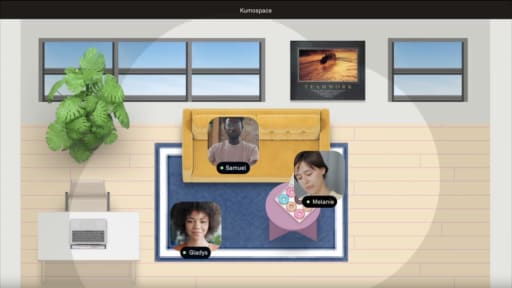
Illustrated panels of people using digital tools, symbolizing social media CRM integration for teamwork and productivity.

Social Media CRM Integration and Why Your Team Needs It

By Sammi Cox

Your CRM knows who your customers are. Your social media channels know how those customers engage with your brand. The problem is that, for many organizations, those systems operate separately. A prospect may interact with multiple social posts, comment on content, or send a direct message before ever becoming a lead. Still, that engagement history is often missing once they enter the CRM.

Social media CRM integration connects those interactions to customer records, creating a more complete view of each relationship. When social and CRM data work together, sales teams gain valuable context, marketing can better measure the impact of social efforts, and customer support can respond with a clearer understanding of the customer's history. This guide explores how social media customer relationship management works, why it matters, and how to implement it effectively.

Key Takeaways

  • Social media CRM integration connects social engagement data with customer records so that sales, marketing, and support teams see the full picture of every interaction across channels.
  • The integration enables lead enrichment from social profiles, social listening that feeds directly into customer records, and attribution of pipeline and revenue to social media activity.
  • Native CRM integrations with platforms like Salesforce, HubSpot, and Zoho are the most reliable path, but third-party connectors like Zapier extend integration to virtually any CRM and social tool combination.
  • Social media customer relationship management goes beyond posting and scheduling by treating social channels as data sources that inform sales conversations, support interactions, and marketing strategy.

What Social Media Customer Relationship Management Actually Means

Social media customer relationship management is the practice of using social media data and interactions as part of your overall customer relationship strategy. It extends the CRM beyond traditional touchpoints like emails, phone calls, and form submissions by incorporating the engagement, conversations, and behavioral signals that happen on social platforms.

The concept goes deeper than simply connecting your company's social media accounts to your CRM software. A true social CRM approach treats social channels as bidirectional communication channels where you can both listen to and engage with customers, and where every interaction enriches the customer profile with context that helps your team serve them better.

In practice, social media customer relationship management combines social listening, lead enrichment, and engagement tracking. Mentions, comments, direct messages, shares, and ad interactions can be connected to CRM records, giving teams a more complete view of how prospects and customers engage with the brand across channels.

Why CRM and Social Media Integration Matter Now

The business case for CRM and social media integration has strengthened considerably over the past few years for reasons that go beyond convenience.

Buyers Research on Social Before They Contact You

B2B buyers in particular consume significant amounts of social content during their research phase before they ever fill out a contact form or respond to an outbound email. They follow company pages, engage with thought leadership posts, review employee profiles, and lurk in comments sections. Without CRM and social media integration, that entire pre-conversion journey is invisible to your sales team.

When social engagement data flows into the CRM, sales reps can see which prospects are warming up before they formally raise their hand. A prospect who has liked four LinkedIn posts, clicked through two social ads, and downloaded a gated asset shared on social is demonstrating buying intent that the CRM would otherwise miss. That visibility lets sales prioritize their outreach and personalize their messaging based on what the prospect has already shown interest in.

Social Is a Customer Support Channel, Whether You Planned for It or Not

Customers don't check your support page to figure out the preferred way to contact you. They go to whatever channel is most convenient, and for a growing number of people, that's social media. A customer who tweets about a billing issue or sends an Instagram DM about a product defect expects a response that reflects an understanding of their relationship with your company.

Without CRM integration, the person responding to that social inquiry has no context. They don't know if this is a long-time enterprise customer or a free trial user. They don't know if there's already an open support ticket for the same issue. They don't know the customer's purchase history, subscription tier, or account health score. CRM and social media integration puts that context at the support team's fingertips, which leads to faster, more informed responses that feel personal rather than generic.

Attribution Requires Connected Data

Marketing teams are under constant pressure to demonstrate ROI, and social media has historically been one of the hardest channels to attribute to pipeline and revenue. The challenge isn't that social media doesn't influence buying decisions. It's that the influence happens through organic engagement, brand awareness, and relationship building that don't produce neat, clickable conversion events.

Social media CRM integration improves attribution by connecting the dots between social engagement and downstream conversions. When a contact's CRM record shows that they interacted with seven social posts, clicked through two social ads, and then booked a demo, marketing can make a credible case that social played a meaningful role in that conversion. Without the integration, those social touches are invisible, and the demo appears to have come from nowhere.

How Social Media CRM Integration Works in Practice

The technical architecture of social media and CRM integration varies depending on the platforms involved, but most implementations fall into one of three categories.

Native CRM Integrations

Major CRM platforms offer built-in social features or native integrations with social media platforms. Salesforce customers typically connect social data through third-party integrations like Sprout Social or Hootsuite, since Salesforce retired its native Social Studio tool in 2024. HubSpot's social media tools allow you to publish, monitor, and track social interactions from within the CRM, with engagement data automatically associated with contact records. Zoho CRM integrates with Zoho Social to sync social interactions with customer profiles.

Native integrations are the most reliable option because they're built and maintained by the CRM vendor, which means they're less likely to break during platform updates and they receive ongoing feature development. The tradeoff is that they typically only cover the social platforms the vendor prioritizes, which may not include every channel your team is active on.

Social Media Management Platform Integrations

Platforms like Sprout Social, Hootsuite, and Buffer offer CRM integration as part of their social media management suite. These tools serve as the hub for social publishing, listening, and engagement, and they push data to the CRM through APIs or native connectors.

Sprout Social's CRM integration is particularly notable because it creates unified customer profiles that combine social interaction history with CRM data, giving support and sales teams a single view of the customer across channels. Hootsuite connects with Salesforce, Microsoft Dynamics, and other CRMs to sync social interactions and enable social selling workflows.

This approach works well for teams that want a dedicated social management tool handling the day-to-day social operations while the CRM remains the system of record for customer data. The social management platform feeds enriched data into the CRM rather than the CRM trying to handle social operations natively.

Third-Party Connectors and Automation

For CRM and social platform combinations that don't have native integrations, tools like Zapier, Make (formerly Integromat), and native API connections bridge the gap. A Zapier workflow might automatically create a CRM contact when someone DMs your brand on Instagram, or update a contact's record when they engage with a LinkedIn ad campaign.

Third-party connectors offer the most flexibility because they can connect virtually any combination of tools, but they require more setup and ongoing maintenance. Automation workflows can break when either platform updates its API, and complex multi-step workflows can become difficult to troubleshoot. For teams without a dedicated operations or RevOps function, the maintenance burden of third-party integrations should be weighed against the benefits.

Setting Up Social Media CRM Integration: What to Prioritize

Integrating every social interaction across every platform into your CRM from day one can create more complexity than value. A better approach is to start with the integration points that have the greatest impact on how your team works and then expand gradually as your processes mature.

For most organizations, the best starting point is lead enrichment. Automatically adding social profile information, job titles, company details, and other publicly available data to CRM records gives sales and marketing teams more context without requiring manual research. From there, add social engagement tracking for key accounts so teams can see how prospects and customers interact with your content across platforms. Connecting social listening tools to the CRM is another valuable step, ensuring that important brand mentions, competitor discussions, and customer conversations are visible alongside existing account data.

Once social data is flowing into the CRM, focus on reporting and attribution. Even simple reports that connect social engagement to lead generation, opportunities, or closed deals can provide useful insights. Over time, you can build more advanced attribution models and workflows, but the goal is to start with data that helps teams make better decisions rather than collecting every possible interaction.

Common Challenges and How to Avoid Them

Social media and CRM integration introduces challenges that teams should anticipate rather than discover in the middle of implementation.

Data quality is the most persistent issue. Social data is messy. People use different names across platforms, operate multiple accounts, and may not have public profiles that match the email addresses in your CRM. Deduplication and contact matching require clear rules and regular audits to prevent your CRM from accumulating duplicate records or attributing social activity to the wrong contacts.

Privacy compliance adds another layer of complexity. Social media data collection and storage must comply with GDPR, CCPA, and other privacy regulations. Your integration should respect platform terms of service, only collect data that's publicly available or consented to, and provide clear data handling practices that your legal team has reviewed.

Internal adoption is often the biggest barrier. An integration that feeds social data into the CRM only creates value if sales, marketing, and support teams actually look at that data and use it in their workflows. This requires training, clear documentation of what the data means and how to act on it, and ongoing reinforcement that the social context available in the CRM leads to better outcomes than ignoring it.

Change management here is as much about communication as it is about process. For distributed teams, that means making the training and the ongoing "look what this data helped us do" conversations accessible and frequent. Teams working in Kumospace can run quick knowledge-sharing sessions where someone walks through a real example of how social CRM data improved a sales conversation or a support interaction. Those organic, five-minute demonstrations do more for adoption than a recorded training video because they're tied to real wins that the team can see and replicate.

Making Social Data Actionable Across Your Organization

The ultimate measure of a successful social media CRM integration isn't the volume of data flowing between systems. It's whether that data changes how people on your team make decisions and interact with customers.

For sales teams, actionable social data means knowing which prospects are actively engaging with your content and using that signal to prioritize outreach. It means referencing a prospect's recent LinkedIn comment in an outreach email because the CRM surfaced it. It means noticing that a key account's decision-maker just followed your company page and treating that as a buying signal worth acting on.

For marketing teams, actionable social data means understanding which content themes drive the most engagement among contacts who eventually convert, and doubling down on those themes. It means seeing that a specific LinkedIn post generated 15 demo requests and understanding what made it different from posts that generated likes but no conversions.

For customer support teams, actionable social data means responding to a social inquiry with full account context, resolving the issue faster, and preventing the negative sentiment from spreading because the response was informed rather than generic.

When the data moves from dashboard to decision, social media CRM integration stops being a technical project and starts being a competitive advantage. The organizations that get this right don't just have better data. They have better conversations with their customers at every touchpoint, which compounds into stronger relationships, higher retention, and a brand reputation that's earned through consistent, context-aware engagement rather than manufactured through marketing campaigns.

Keeping Social CRM Collaboration Connected with Kumospace

Social media CRM integration is not just a technology project. It requires sales, marketing, customer success, and support teams to stay aligned on how social data is collected, interpreted, and used. The challenge is that many of the most valuable insights come from quick conversations rather than formal reports. A salesperson may notice a prospect engaging heavily with LinkedIn content, while a support manager spots a recurring customer concern on social media. Sharing those insights quickly helps teams act before opportunities or issues are missed.

Kumospace helps distributed teams collaborate around social CRM workflows by creating a virtual office where conversations happen naturally throughout the day. Marketing can review engagement trends with sales, customer success can share feedback from social channels, and teams can quickly align on outreach strategies without waiting for a scheduled meeting. The ability to move from discussion to action in real time keeps customer data from becoming siloed across departments.

The platform's Virtual Office and Online Whiteboard features are especially useful for cross-functional planning. Teams can map customer journeys, review social engagement patterns, brainstorm campaign strategies, and document CRM workflows together in a shared visual workspace. Instead of managing social CRM initiatives through scattered messages and lengthy email chains, teams can collaborate in one environment where information, decisions, and follow-up actions stay connected.


Summary

A successful social media CRM integration gives sales, marketing, and support teams a complete view of customer interactions by connecting social engagement data directly to CRM records. Instead of treating social media as a separate channel, organizations can use social activity to enrich lead profiles, improve customer support, strengthen attribution, and create more personalized customer experiences. The most effective implementations start with high-impact use cases like lead enrichment and engagement tracking before expanding into more advanced reporting and automation.

The key to success is focusing on action, not just data collection. Whether using native integrations from platforms like Salesforce, HubSpot, or Zoho, or connecting tools through solutions like Zapier, the goal is to make social insights accessible and useful across the organization. When teams can see how prospects engage with content, identify customer concerns earlier, and connect social activity to revenue outcomes, social CRM becomes a strategic advantage that improves collaboration, strengthens customer relationships, and helps every department make better-informed decisions.

Frequently Asked Questions

Transform the way your team works from anywhere.

A virtual office in Kumospace lets teams thrive together by doing their best work no matter where they are geographically.

Headshot for Sammi Cox
Sammi Cox

Sammi Cox is a content marketing manager with a background in SEO and a degree in Journalism from Cal State Long Beach. She’s passionate about creating content that connects and ranks. Based in San Diego, she loves hiking, beach days, and yoga.

Transform the way your team works.