Illustration of remote team members showing various hand gestures, symbolizing nonverbal cues in distributed work.

Nonverbal Cues in Remote Work and Why They Matter

By Brett Martin •

Remote work strips out most nonverbal communication: posture, gesture, physical distance, and much of vocal tone. That leaves teams inferring intent and agreement from words and a cropped video window, so tone gets misread, trust builds slower, and feedback lands harder than anyone meant it to. In a shared office a raised eyebrow or a relaxed shoulder would settle the question in a second, and the lack of nonverbal cues in remote work removes that shorthand entirely.

Key Takeaways

  • Missing body language strips remote teams of context for intent, emotion, and agreement, which makes feedback feel harsher, trust slower to build, and miscommunication more common across functions, cultures, and seniority levels.
  • You can partly compensate by over-communicating intent, naming emotions explicitly instead of relying on tone, and using video deliberately with good lighting and visible gestures, but these tactics only restore some of what in-person interaction provided.
  • Remote leaders have to model explicit nonverbal habits, set clear norms for when a conversation belongs on video versus chat or email, and build rituals that recreate the informal connection an office used to provide automatically.

What nonverbal communication means in remote work and what you actually lose

Nonverbal communication covers everything beyond the literal words: body language, facial expressions, posture, eye contact, hand gestures, vocal tone, pacing, and the use of physical space. In a shared office, people read these cues constantly and mostly unconsciously, in hallways, meeting rooms, and the small talk before a meeting starts. Moving that same interaction onto video, chat, or email strips most of it away.

The channels that degrade most are full-body posture, peripheral awareness of who else is around, proxemics (physical distance and orientation), and haptics like handshakes or a hand on the shoulder. A standard webcam crops out the body and hands entirely, poor lighting hides facial expression, and audio compression flattens vocal tone, so what would be a rich, multi-channel signal in person arrives through one narrow channel.

A popular claim holds that "93 percent of communication is nonverbal," but  that badly misapplies Albert Mehrabian's 1967 experiments, which measured only how people judged feelings from single spoken words paired against a conflicting tone or facial expression, not general workplace communication. In an actual work conversation, giving direction, debating a roadmap, or negotiating scope, the words carry far more of the meaning than that oft-cited rule implies.

How lack of nonverbal cues creates misread tone and slower decisions

Losing that context shows up as longer Slack threads spent clarifying what someone actually meant, slower decisions in roadmap debates, and unnecessary friction in quarterly reviews or incident postmortems. On a video grid, reduced eye contact and delayed facial reactions can make a leader look disengaged or critical when they're only taking notes or dealing with lag, and a supportive comment can land as silence once the tone that would have softened it is gone.

Text-only channels remove vocal tone and facial expression entirely. A 2008 paper in the Academy of Management Review by Kris Byron argues that email's missing nonverbal cues and delayed feedback lead receivers to read work messages as more negative, or more neutral, than the sender intended. In Grammarly's 2019 survey of its users, more than half of respondents said they worried about using an appropriate tone in the workplace. That gap hits new hires and cross-cultural teams hardest, since they have the least shared context to fall back on when a message reads more harshly than intended.

Hybrid teams face an added imbalance: people in the room share side glances, seating dynamics, and physical gestures with each other, while remote participants get a single static camera view and compressed audio, so the two groups are never quite reading the same conversation.

In-person cues vs remote signals in common work situations

Scenario

Nonverbal cues available in person

What is missing or distorted remotely

One-on-one feedback

Manager's relaxed posture, half-smile during critique, leaning back to signal openness, eye contact calibrated to the person's comfort

Cropped webcam showing only face with neutral expression; lag makes nods arrive late; no sense of body orientation

Team standup

Side glances between colleagues signaling shared understanding, physical gestures like thumbs-up, who leans in or checks out

Gallery grid of static tiles; hard to tell who is paying attention; muted mics hide verbal back-channel

Brainstorming workshop

Open hand gestures, people standing up at whiteboards, seating rearrangements, visible excitement or hesitation

Screen sharing dominates; participants become passive viewers; quieter voices get talked over without visual prompts

Conflict discussion

Crossed arms, flushed face, voice tremor, mutual gaze or avoiding eye contact, chair shifts signaling discomfort

Poor lighting hides flush; audio compression flattens vocal tone; limited visibility of posture below shoulders

First week for a new joiner

Watching who others gravitate toward at lunch, catching the tone when someone jokes about a process, reading the room during introductions

A calendar of scheduled introductions, no ambient sense of who is approachable, no way to tell which written norms are real and which are aspirational

Core elements of nonverbal communication and how remote work distorts each

Eye contact, facial expression, body language, vocal tone, and text cues each degrade differently online, so each needs a different fix. Video calls also add a real cognitive cost: people work harder to consciously interpret cues that used to register automatically, and knowing which channel is failing helps you spend that effort where it actually counts.

Jeremy Bailenson's 2021 paper on the causes of Zoom fatigue identifies four mechanisms behind it: excessive close-up eye gaze, the cognitive load of consciously producing and monitoring your own nonverbal cues, self-evaluation from watching your own video feed, and constraints on physical mobility. Bailenson framed these as theoretical arguments rather than settled findings, and a 2023 study by Fauville and colleagues involving 9,787 participants found empirical support for Bailenson's theory of nonverbal overload, with more fatigue among people who used video conferencing more often, for longer stretches, and with fewer breaks, and notably higher fatigue reported by women. The sections below on eye contact, facial expressions, and body language draw on that framework; vocal tone and digital cues sit outside its scope.

Eye contact

Eye contact is one of the clearest trust and attention signals humans read, in person or on screen. On a video call, looking at someone's face on your screen means your eyes sit slightly below the camera lens, so what feels like direct attention to you registers as avoided eye contact to the other person. Raise your webcam to eye level, move the active speaker's video window as close to the camera lens as you can, and look directly into the lens for moments that matter most: delivering feedback, asking for input, or committing to a decision. On larger group calls, sustained staring into the lens reads as intense, so use short, deliberate bursts of camera contact and scan participant thumbnails the rest of the time.

Facial expressions

Remote participants mostly see your face and shoulders, so micro-expressions and resting facial expression do much of the work of conveying engagement, while lighting affects how clearly those cues are visible. Poor lighting, camera filters, and low resolution can flatten subtle expressions and make you look disengaged even when you're fully involved. Use natural light or a simple ring light positioned in front of you, slightly more visible nodding, and intentional reaction faces to make your engagement legible on screen the way it would be obvious in person.

Body language and hand gestures

A standard laptop webcam crops out most of your body and sometimes your hands, which removes cues like open posture and supportive gestures. Position your camera far enough back to include your upper torso and hands, and keep gestures smaller and more deliberate since large ones translate poorly on camera. Leaning slightly forward when someone else is speaking is a small, clear signal of active listening that still reads on screen, and it helps the other person feel heard even through a grid of video tiles.

Vocal tone and pacing

On many calls, your voice is doing more work than your posture, especially when people dial in by phone or the meeting is mostly screen sharing. Compression on video conferencing software flattens pitch and volume, which can make ordinary phrasing sound flatter or harsher than intended, so it's worth being deliberate about tone rather than relying on it to come through naturally. Speak slightly slower than you would in person, build in short explicit pauses for questions, and vary your tone on purpose to signal enthusiasm, concern, or a decision point. For coaching conversations or workshops where tone really matters, turn on the highest-quality audio settings you have available.

Digital cues in text-based communication

When body language and facial expression are absent, punctuation, line breaks, response time, and the occasional emoji become your nonverbal signals. A one-word "Fine." can read as annoyed, while "Sounds good, thanks for pushing this forward" carries warmth for almost the same effort. Short, quick confirmations paired with sparing emoji use soften direct feedback, and in global teams it's worth being conservative with sarcasm and culturally specific emoji, since both are easy to misread without shared context. Writing with explicit intent, for example, "I'm flagging this because I want to help, not criticize," heads off a lot of the misinterpretation that plagues async communication.

Why the lack of nonverbal cues matters most for trust, feedback, and collaboration

Trust, feedback, and collaboration are especially vulnerable because each depends on quickly reading intent, receptiveness, and agreement. Remote work cuts out the informal interactions that normally build a sense of reliability and warmth: hallway conversations, shared meals, someone spontaneously helping with a stuck problem. People end up inferring those qualities from scheduled interactions and digital traces instead, which is a much slower path to trust.

Feedback and difficult conversations feel more brittle over video, since you can't read small shifts in posture or expression to calibrate how hard a message is landing, and team members may hold back ideas simply because they can't tell whether the room is receptive. A distributed product team debating roadmap priorities on video, for example, loses the smiles and relaxed posture that would soften the same critique in person.

Group problem-solving suffers for a related reason: you can't see who's leaning in, who wants to speak, or the side glances that signal partial agreement or quiet doubt. On an engineering incident call, nobody notices that the on-call engineer has been trying to interject for two minutes. In a curriculum meeting, two people exchange a look about a proposal, say nothing, and it passes unopposed only to unravel later. Both are the same failure: the nonverbal signals that normally guide turn-taking and signal tacit agreement simply aren't visible.


Practical strategies to compensate for missing body language in remote teams

You can't fully recreate in-person interaction on a screen, but you can design remote interactions so the cues that matter most get surfaced on purpose instead of left to chance.

At the meeting level: default cameras on for small-group calls where trust and alignment matter, add an explicit check on emotional temperature to the agenda ("how does everyone feel about this direction?"), use round-robin sharing to draw out quieter voices, and open with a two-minute personal check-in to rebuild some of the informal connection an office provides for free.

Environment matters too: stable internet, decent lighting, a neutral background, a webcam at eye level, and a headset that improves audio clarity all reduce the odds that a technical limitation gets misread as a personal one.

In chat, write what you're feeling and why. Phrases like "I'm excited about this approach" or "I'm concerned the timeline is too tight" label emotions that would normally come through facial expression, and acknowledging a message quickly, even with a short "seen, thinking on this," stops silence from reading as disapproval. For complex or sensitive topics, a short recorded video update usually communicates intent faster and more accurately than a long wall of text.

Adapting your leadership and team norms for nonverbal communication in remote work

Fixing this is mostly about leadership behavior and team norms, not individual charisma. Leaders should name the limits of remote nonverbal cues out loud, saying something like "you can't see me smiling right now, but I'm genuinely happy about this," which removes guesswork that otherwise drains a remote team's energy.

Clear channel norms help too: video for one-on-ones, retros, conflict resolution, and onboarding; cameras-off is fine for large all-hands or pure information broadcasts. Short, regular one-on-ones focused on the relationship rather than just status also do real work here, and new hires and early-career employees deserve extra face time and explicit feedback, since they have the least context to fall back on when a signal is unclear. Reviewing recordings of real meetings, with consent, is a low-cost way to build a shared team language for what clear, and confusing, nonverbal communication actually looks like on camera.

How virtual offices can restore context in remote communication

Most of the fixes above require deliberate changes to how remote and hybrid teams communicate. But even strong documentation and meeting practices cannot fully replace the ambient context of an office, knowing who is around, who is available for a quick question, or who is already talking with someone. Standard video conferencing turns those interactions into scheduled events.

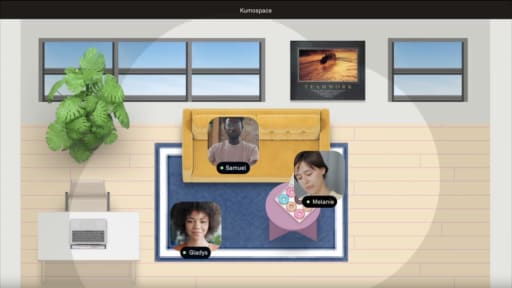
Kumospace is a virtual office platform designed to recreate some of that informal visibility for remote and hybrid teams. With spatial audio and visual proximity, employees can see who is around, move into conversations, and have quick interactions without scheduling another meeting.

At Primerica, a senior vice president reported saving about $100,000 annually in office costs after moving a roughly 30-person team into a virtual office. At Connexus, one 25-person team reported a 10 percent productivity gain after adopting Kumospace. Used alongside existing meeting and project-management tools, a persistent virtual office can help restore some of the informal context and spontaneous collaboration that distributed teams often lose.

What to change when remote communication is missing context

Nonverbal cues don't disappear in remote work. They get compressed into one narrow channel, a small video window or a wall of text, and most teams never redesign for it. Missing body language in remote teams hits trust, feedback, and turn-taking hardest, because each one depends on reading intent fast.

The changes that work are small and specific: raise the camera to eye level, name emotions in writing instead of relying on tone to carry them, and set channel norms so one-on-ones, retros, and conflict happen on video while all-hands can stay cameras-off. Leaders have to say the quiet part out loud too, as in "you can't see me smiling right now." None of this closes the gap completely, and some loss is the tradeoff of working remotely.

Frequently asked questions

Transform the way your team works from anywhere.

A virtual office in Kumospace lets teams thrive together by doing their best work no matter where they are geographically.

Headshot for Brett Martin
Brett Martin

Brett Martin is the President & Co-Founder of Kumospace. He has spent his career as a serial entrepreneur, either building or investing in technology startups. To date, he has invested in over 60 companies through his fund, Charge Ventures. Brett and his companies have received numerous awards and have been featured in hundreds of media outlets. Outside of tech, Brett founded an indie rock band, started a non-profit, and sailed 6,000 miles on a 30ft sailboat.

Transform the way your team works.