Every team meeting is an opportunity to strengthen connections, spark energy, and make people genuinely glad they showed up. This guide gives you concrete, ready-to-run fun games for team meetings, with examples suited to remote teams, hybrid groups, and in-person offices. Pick a game, set a timer, and watch your team come alive.
Key Takeaways
- The best team building games double as icebreakers and quick energizers, fitting inside weekly check-ins, brainstorming sessions, and monthly all-hands without derailing the agenda.
- This guide covers fast icebreakers, creative challenge games, critical thinking activities, scavenger hunt ideas, and friendly competition formats for small teams and large groups alike.
- A short FAQ at the end answers practical questions about timing, group size, remote-friendly setups, and how often to run games.
- Team building games should be quick and require minimal setup, so they feel like a natural part of work, not an obligation.
What Makes Fun Games for Team Meetings Work?

Fun games for team meetings are quick, structured activities that create friendly competition, connection, and focus without feeling forced. The key: they match the meeting's purpose. An energizer for a Monday standup looks different from a creative challenge before a brainstorming session or a team-building exercise that deepens relationships at a quarterly all-hands.
Remote teams and hybrid teams benefit the most from regular online games. Without hallway chats and break room banter, team bonding has to be intentional. Research shows that 72% of employees believe team bonding reduces workplace stress, and organizations with engaged teams see roughly 21% higher profitability. Games that encourage participation can increase team morale and bonding, while engaging in team activities improves team knowledge and connections. Team-building activities also improve communication and collaboration skills across the entire team. Virtual team games improve remote collaboration and team bonding even when people are working remotely across time zones.
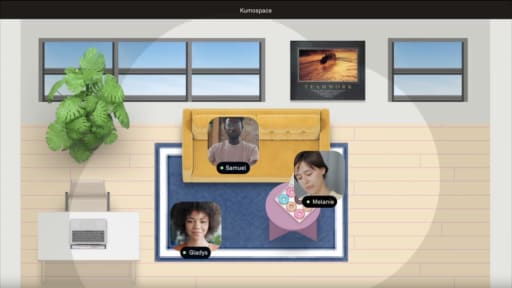
Tools like Kumospace make these games smoother by providing persistent virtual spaces, breakout-style areas, and movement-based interactions. Search interest in "virtual team building" has grown roughly 736% since 2019 and hasn't returned to pre-pandemic baselines.
Quick Icebreaker Games to Start Any Meeting
These icebreakers take 5–10 minutes, require little or no prep, and are ideal at the start of recurring team meetings. Quick energizers can break up routine meetings and spark collaboration. They respect introverts, work in person and on a Zoom call, and avoid cringe. Icebreakers can foster interaction and laughter among team members. Rotate who chooses the icebreaker each week so the team leader isn't always driving.
Other quick formats worth knowing: Penny for Your Thoughts requires 5+ people and takes 2–3 minutes per person, and Mood Pictures can be played in 2–3 minutes with 5+ people. Both are low-pressure alternatives to the games below.
1. "One Word Check‑In"
Each team member describes their current mood in a single word, with an optional one-sentence elaboration. Sample prompts: "One word for how your week is going," "One word for what you need from today's meeting." For large groups, have some answer in chat while a few share out loud. In Kumospace, people talk by moving to labeled areas ("energized," "stressed," "curious") before sharing.
2. "Two Truths and a Twist"
A variation on the classic game Two Truths and a Lie: participants share two facts and one exaggerated "twist" about themselves. Two Truths and a Lie takes 2–3 minutes per person and requires 3+ players. People vote in chat or with reactions for turns, guessing which statement is the twist. Tie prompts to personal stories like travel, hobbies, or a first job. Participants can share personal facts to find shared experiences, making this a natural conversation starter. Cap at 15 minutes total.
3. "Meeting Bingo"
Meeting Bingo uses digital or printed cards filled with common meeting moments: "someone's pet appears," "Wi-Fi glitch," "mentions a specific project codename." Share cards before the call or drop a link in chat. Virtual Bingo enhances engagement during online meetings. Keep it optional so it doesn't distract. The prize? The first person to complete a row gets to choose next week's fun game.
4. "Would You Rather… (Work Edition)"
A no-prep, 5–10 minute game where the facilitator asks workplace-themed questions. Sample questions:
- Work a four-day week with longer hours or five shorter days?
- Have unlimited coffee or unlimited snacks at your desk?
- Only communicate via email for a week or only via video call?
- Lead a meeting with a week's notice or improvise on the spot?
Creative Challenge & Brainstorming-Friendly Games

These fun games double as creative warmups, perfect before a brainstorming session, design review, or strategy workshop. They focus on imagination and visual thinking rather than physical skills, making them inclusive for any virtual team. Most run 10–20 minutes. Timebox strictly to avoid overrunning the main agenda.
Creative games like Build a Tower promote collaboration under pressure, and Back-to-Back Drawing enhances non-verbal communication skills and active listening. Both are worth exploring alongside the games below.
5. "Lightning Story Around the Circle"
One team member presents a sentence to start a story, and the next person adds exactly one sentence. Use prompts tied to work themes: "Our product just went viral in 2030…" or "We wake up to find our team on a desert island with only laptops." The last person wraps it up. Close with a quick reflection on surprising ideas worth exploring in a real brainstorming session. This interactive game builds creative thinking and keeps the whole team engaged.
6. "Doodle Chain on a Shared Whiteboard"
Each person adds a small drawing to a virtual whiteboard (Miro, FigJam, or an embedded whiteboard in Kumospace). Themes: "our dream office," "the future of our industry." Each person gets 30–45 seconds to draw while others guess in chat. Pictionary can be played collaboratively on a virtual whiteboard, combining guessing with collaboration. The person with the most correct guesses wins bragging rights. Save the finished board as a fun artifact.
7. "PowerPoint Karaoke – Micro Edition"
Only one person presents a 3–4 slide deck they've never seen, improvising a story for 2–3 minutes. Create decks by pulling random images, charts, or screenshots from the company history. This builds speaking confidence and quick thinking. Keep it optional-no one should feel pressured. Use screen share or a shared presentation screen, so everyone sees slides in real time.
8. "Object Remix Brainstorm"
A creative challenge where small groups choose a common object (coffee mug, sticky note, headset) and brainstorm 10 new uses for it. Use breakout rooms of 3–5 people; each group records ideas in a shared doc. Each group shares its most surprising idea with the full team for friendly competition. This game stretches problem-solving abilities and makes teams learn to think laterally. In Kumospace, players can "grab" nearby virtual objects as inspiration.
Critical Thinking & Problem-Solving Games
These games build critical thinking, negotiation, and decision-making skills. They're largely verbal or slide-based, making them ideal for distributed remote teams who meet on video and can use breakout rooms. End each game with a 2–3 minute debrief linking lessons back to teamwork skills and real projects. Split large groups into multiple small groups, then reconvene for a share-out.
The Egg Drop challenge promotes problem-solving and collaboration skills-the egg drop game requires teams to protect a raw egg using limited materials, and it's a great game for in-person sessions.
9. "Desert Island Toolkit"
Small teams agree on five items from a longer list to bring to a fictional desert island. Items: solar-powered radio, water purifier, flare gun, fishing kit, satellite phone, deck of cards, and first aid kit. Teams debate in breakout rooms for 8–10 minutes, then a spokesperson presents their reasoning. The Desert Island game enhances critical thinking and teamwork. It reveals different risk tolerances and priorities, making it one of the best team-building games for building connections.
10. "Lifeboat Debate – Roleplay Edition"
Each participant gets a character card ("data engineer," "school teacher," "doctor," "artist," "farmer") and argues why they deserve a limited lifeboat seat. Format: 2 minutes to read cards, 5–8 minutes for open debate, 3 minutes for a team vote. The team chooses who stays. Keep tone light with slightly exaggerated details. Moderators should ensure the debate stays respectful, especially for distributed teams with different cultural norms.
11. "Three-Minute Case Crackers"
Share a one-paragraph fictional scenario ("Our new feature launch flopped" or "Customer support volume spiked overnight"). Groups get 3 minutes to list three actions. Each group shares a single top action. Use a visible timer. This doubles as a warm-up for real problem-solving meetings and helps teams solve problems under pressure, perfect for day-to-day work readiness.
12. "Silly Debates for Sharp Thinking"
Two teams each pick a volunteer. They argue opposite sides of a playful topic: "cats vs dogs for office mascots" or "email vs chat for announcements." Each person gets 45–60 seconds, then the team votes on the convincing argument. Topics are silly, but participants practice structuring arguments. In Kumospace, stage the debate in a virtual auditorium for extra fun. Word association warm-ups before the debate can prime people to talk more freely.
Scavenger Hunts & Movement-Based Games

Scavenger hunts get people out of their chairs, reduce Zoom fatigue, and work well for long meeting days. They adapt naturally to remote teams, hybrid meetings, and virtual office platforms like Kumospace. Scavenger hunts can involve 8 or more people simultaneously. Many are perfect for large groups since everyone participates at once.
Other movement-based options: Birthday Line Up requires 8+ players and takes 10–15 minutes, Earth-ball can be played with 5 to 20 participants, and the minefield game requires 4 to 10 players. An obstacle course variation works well outdoors for in-person events.
13. "Lightning Scavenger Hunt – Home Edition"
The facilitator calls out prompts ("something older than you," "a gift from 2020," "your favorite mug") and participants have 30–45 seconds to find each item. Lightning Scavenger Hunt energizes teams in 10–15 minutes. The first team back with items on camera scores points, or everyone earns a point for showing and explaining. This is a great game for remote workers who need a burst of energy.
14. "Unique Thing in Common"
Small breakout groups race to find the most unusual thing everyone shares. Prompts: childhood hobbies, memorable concerts, favorite snacks. Each group reports one "unique commonality," and the team votes on the most surprising. This uncovers personal stories and inside jokes without forcing anyone to overshare, making it ideal for building connections in cross-functional meetings. Stronger teams emerge from shared discovery.
15. "Show & Tell Personality Hunt"
Each person grabs three objects that reveal something about them (favorite book, travel souvenir, hobby tool). Divide employees into breakout rooms of 4–6 people so one team member gets about a minute to share. Themes: "one item from 2019 or earlier," "something that represents your ideal weekend." Follow-up questions from the group deepen the conversation. This team-building activity fits into weekly remote meetings in under 15 minutes.
16. "Office or Virtual Space Scavenger Route"
Place virtual or real "stations" around the space with challenges or questions. At each station, teams take a group selfie, answer a trivia quiz question about the company, or complete a 30-second creative challenge. Use a shared checklist where teams upload photos or answers. This format is ideal for quarterly all-hands or onboarding cohorts in a physical meeting room or a Kumospace virtual space.
Kumospace for Interactive Team Meeting Games
Many team meeting games work on standard video calls, but some become more engaging in a virtual office environment. Kumospace recreates the feel of an in-person workspace by letting participants move through a shared 2D space with spatial audio, so conversations naturally begin and fade based on proximity instead of everyone staying in the same video grid.
This setup works especially well for icebreakers, scavenger hunts, brainstorming sessions, and small-group activities. Teams can move between breakout areas without creating separate meeting links, gather around virtual whiteboards, or use different spaces for debates, workshops, and creative challenges.
For remote and hybrid teams looking to make regular meetings feel less repetitive, a virtual workspace like Kumospace can make collaborative games and team-building activities feel more natural while keeping everyone in the same shared environment.
Summary
Team meeting games are most effective when they're quick, easy to run, and aligned with the meeting's purpose, whether that's energizing the team, encouraging creativity, or improving collaboration. This guide covers a variety of activities for remote, hybrid, and in-person teams, including icebreakers, brainstorming challenges, problem-solving exercises, scavenger hunts, and friendly competitions that help strengthen communication and engagement without disrupting productivity.
Success depends on keeping games simple, inclusive, and purposeful. Rotating activities, hosting occasional team events, encouraging participation, and using collaborative tools such as Kumospace for virtual spaces can make meetings more interactive and help build stronger team connections over time.
Frequently Asked Questions
Most teams can include a 5–10 minute game at the start of weekly meetings, plus longer sessions (20–30 minutes) once a month. Survey your team every few months to adjust frequency. Tie longer game blocks to milestones like project kickoffs or new hire onboarding so they feel purposeful rather than like time-wasters.
Start with low-pressure, fast activities that relate to work: critical thinking puzzles, quick check-ins, or word association rounds. Ask for anonymous feedback after a couple of sessions and invite team members to suggest their own games. Begin with something as simple as a One Word Check-In and build up only if the team responds well.
Use whole-group games (polls, emoji Pictionary, quick trivia) and split into smaller breakout rooms for deeper activities. Appoint co-facilitators to manage chat, breakouts, and timing. Virtual venues like Kumospace host large groups naturally by letting people cluster into smaller "tables" before reconvening.
Most games only require a standard video conferencing platform, a simple slide deck or virtual whiteboard, and a digital timer. Some activities become more engaging in virtual offices like Kumospace, which add movement and shared objects without a complex setup. Choose tools that the team already uses to lower the barrier.
Avoid culturally specific references or idioms. Choose neutral prompts (travel, hobbies, music, food). Offer alternatives to physical movement or camera-based participation. Encourage teams to rotate facilitators from different regions and backgrounds, so game choices reflect the whole team's diversity over time. Non-verbal communication skills games like Back-to-Back Drawing work across language barriers especially well.