Stylized teamwork illustration with communication bubbles and productivity icons, symbolizing client collaboration platforms.

Best Client Collaboration Software for Web Agencies

By Sammi Cox

Managing client work across email threads, disconnected meeting links, and scattered files quickly leads to missed updates and unnecessary friction. Modern client collaboration software brings communication, file sharing, project tracking, and meetings into one place, making it easier for teams and clients to stay aligned.

This guide explores the best client collaboration tools, the features that matter most, and how to choose the right platform for your team and clients.

Key Takeaways

  • Modern client collaboration platforms combine project tracking, file sharing, and real-time collaboration so both your team and your clients see the same picture at all times.
  • Core benefits include faster approvals, fewer misunderstandings, better project visibility, and more profitable client work for agencies, consultancies, and small teams.
  • Effective collaboration tools reduce misunderstandings and improve client relationships by keeping every decision, file, and comment discoverable in context.

Why Client Collaboration Software Matters in 2026

Remote and hybrid work since 2020 has permanently changed client communication. Shared online workspaces are now the default, not the exception. The collaboration software market is projected to reach US$18.5 billion by 2026, and the reasons are practical, not hype-driven.

Think about managing client projects over long email threads, ad-hoc meeting links, and unsearchable attachments. A digital agency running 15 active web builds, or a consulting firm coordinating 10 external stakeholders on a 6-month transformation project, will drown in "Did you see my email?" and conflicting instructions. Client collaboration software centralizes communication and project details, bringing project tracking, client communication, and file sharing into a single client collaboration platform.

For small teams, the right collaboration tools can act as both a lightweight project hub and a simple client portal, eliminating the need for separate systems. Real-time collaboration tools keep projects moving efficiently by surfacing updates the moment they happen, rather than after the fact. The result: fewer revision cycles, faster approvals, and the capacity to take on more client projects without adding headcount.

What Is Client Collaboration Software (and How Is It Different from Internal Tools)?

Client collaboration software is a platform that lets internal team members and external clients work together in one shared, secure workspace throughout the whole project lifecycle. Typical capabilities include project tracking, task comments, approvals, document sharing, real-time collaboration on assets, and simple status views clients can access whenever needed.

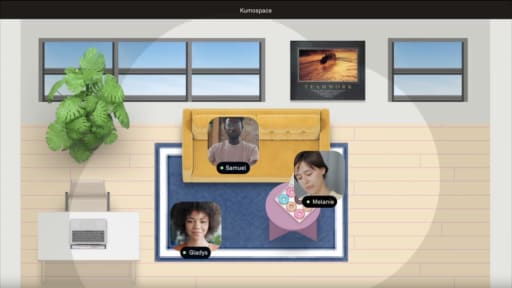
Internal-only team collaboration tools assume everyone has the same permissions, context, and access. Client collaboration tools flip that model: guest access, granular permissions, and an intuitive interface mean clients don't need a training deck to see what's happening. Kumospace blurs the line further by offering internal rooms plus dedicated spaces where you can invite clients to join live for workshops and reviews, making the collaboration process feel natural rather than forced.

How to Choose Client Collaboration Software

The "best" collaboration platform depends on your team size, project complexity, and whether you collaborate live or asynchronously. Start from concrete use cases: onboarding new clients, running weekly status meetings, sharing files, and capturing client feedback on drafts.

Here's a simple evaluation checklist:

  • Must-have features: Look for real-time collaboration features, strong task management capabilities, and easy file sharing and document management.
  • Security and compliance: Encryption, SSO, audit logs, and compliance certifications (SOC 2, GDPR).
  • Pricing model: Per-user pricing vs. flat fees; free plan availability for testing.
  • Integrations: Does it sync with your existing tools (Slack and Microsoft Teams, Google Drive, CRM)?
  • Client learning curve: A user-friendly interface is crucial for client collaboration tools. Select tools that provide clear visibility of project progress without requiring training.

Choose software with strong task management capabilities that can handle both small, fast projects and longer, complex projects with evolving scopes and stakeholders.

Core Features to Look for in a Client Collaboration Platform

Choose a platform that's as easy for clients as it is for your team.

  • Simple interface: Clients should be able to log in and immediately see tasks, deadlines, and updates without training. Branded portals and spaces, like Kumospace's virtual rooms, make onboarding smoother.
  • Task and project tracking: Look for task assignments, due dates, milestones, Kanban or timeline views, and automation for reminders and status updates. Linking feedback directly to tasks keeps nothing from getting lost.
  • Real-time collaboration: Live document editing, whiteboards, screen sharing, comments, and video meetings help teams and clients work together without delays. Persistent virtual spaces also make quick check-ins easier.
  • Collaboration beyond chat: The best platforms combine messaging with approvals, discussion threads, decision logs, and shared task boards so conversations stay connected to the work.
  • Document sharing: Store files alongside related tasks, support previews and comments, and integrate with Google Drive, Dropbox, or OneDrive to reduce version confusion.
  • Security and permissions: Granular access controls, encryption, SSO, audit logs, and custom branding ensure clients see only their own projects while maintaining a professional experience.

Best Client Collaboration Tools

This is a curated overview of tools supporting modern, hybrid client work, not an exhaustive list. Each entry summarizes what the tool excels at and when to consider it.

Kumospace

Kumospace is a virtual office and client collaboration platform combining video, spatial audio, and shared content for immersive teamwork. Teams create dedicated client rooms for workshops, ongoing check-ins, and live co-working. Key features include customizable client portals and secure file sharing, with screen sharing, integrated apps, and persistent spaces so clients always know where to "meet" their team. Ideal for distributed teams and consultancies wanting a branded, always-on environment instead of one-off meeting links. Kumospace plugs into existing project tracking and file sharing tools to become the live layer of your collaboration stack.

Popular Project Management–Centric Tools

These project management tools provide the backbone for managing projects with task assignment, advanced features, and reporting:

  • Asana: Asana's Starter plan is priced at $10.99/user/month. Strong for team productivity, custom workflows, and collaboration efforts across departments.
  • Monday.com: Monday.com offers plans starting at $9/user/month for customizable workflows, with a visual approach to project planning.
  • Teamwork.com: Teamwork.com offers project management features for $9.99/user/month, tailored for agencies managing client projects.
  • Trello: Trello's pricing starts at $5/user/month for its Standard plan-great for basic features and Kanban-style boards.

Many offer a free plan for small teams. Test how easy it is for clients to log in, comment, and understand project status without extensive training. These are the right collaboration tools when you need to assign tasks, manage tasks, and track task statuses at scale.

Communication-First Tools

Slack, Microsoft Teams, Zoom, and Google Meet are essential for live client communication and quick problem-solving. Slack's Pro plan costs $7.25/user/month for real-time communication. These shine for seamless collaboration on calls but should be paired with structured project and document management tools for full client workflows. Kumospace occupies a similar category but adds persistent, spatial environments that feel more like a real office. Integrations can push notifications from project tools into chat channels to reduce context switching.


Summary

Client collaboration software helps agencies and service teams manage communication, file sharing, project tracking, and client feedback in one place, making projects more transparent and reducing delays. The right platform improves collaboration by giving both teams and clients a shared workspace with clear visibility into tasks, approvals, and progress.

Leading options include project management tools like Asana, Monday.com, Teamwork.com, and Trello, communication platforms like Slack and Microsoft Teams, and Kumospace for immersive virtual collaboration. Choosing the right solution depends on your workflow, but the best platforms make it easier to keep clients engaged, streamline approvals, and deliver projects more efficiently.

Frequently Asked Questions

Transform the way your team works from anywhere.

A virtual office in Kumospace lets teams thrive together by doing their best work no matter where they are geographically.

Headshot for Sammi Cox
Sammi Cox

Sammi Cox is a content marketing manager with a background in SEO and a degree in Journalism from Cal State Long Beach. She’s passionate about creating content that connects and ranks. Based in San Diego, she loves hiking, beach days, and yoga.

Transform the way your team works.