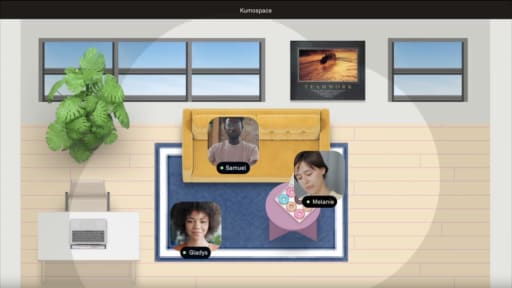
Choosing a Sococo alternative isn't just about switching virtual office platforms. It's about finding a workspace that matches how your team collaborates, whether that's maintaining an always-on office, hosting virtual events, or reducing the need for separate communication and meeting tools.
This guide compares the best Sococo alternatives in 2026, covering their key features, strengths, and ideal use cases. Whether you're looking for richer collaboration, built-in video conferencing, or a more flexible virtual office, you'll find the platform that's right for your team.
Key Takeaways
- Sococo works best for teams that want a lightweight virtual office layered on top of Zoom, Microsoft Teams, or other existing meeting tools, while Kumospace is a stronger choice for organizations looking to consolidate collaboration into a single platform.
- The best Sococo alternative depends on how your team works. Kumospace is ideal for everyday remote collaboration, Gather suits teams that want a social, game-style environment, SoWork fits teams that want AI meeting summaries built in, and WorkAdventure is suited to teams that need deep customization or self-hosting.
- Successful adoption depends more on team habits than features. Choose a platform that fits your collaboration style and existing workflow, then encourage consistent use to get the most value from your virtual office.
Sococo alternatives and competitors compared side by side
|
Product |
Best for |
Pricing model |
Adoption profile |
Main constraint |
|
Sococo |
Teams wanting a presence layer over Zoom, Webex, or Teams |
$14.99-$24.99/seat/month at list, or from $13.49/seat/month billed annually, with the $24.99 Unlimited tier sold on a yearly term at a 100-seat minimum; 500-minute pooled native media allowance, overage at $5/1,000 min |
Fast for colleagues already operating in a calendar-driven meeting workflow |
Native media capped at 500 min/seat/month pooled |
|
Kumospace |
Remote-first SMBs wanting an always-on virtual office with meetings, chat, and events |
Free for small teams up to 5 members; Business at $16/member/month |
Most teams comfortable within 1-2 weeks of daily use |
Whole-team adoption required for value to appear |
|
Gather |
Teams that love a gamified 2D virtual world for collaboration |
Playful aesthetic speeds adoption for creative and engineering teams |
Game-style environment can feel informal for client-facing companies |
|
|
SoWork |
Teams wanting an AI-powered virtual office alternative with meeting summaries |
Free up to 10 users with a 30-minute meeting cap; Basic $6/user/month, or $5.40/user/month billed annually |
Requires training on AI features; growing feature set |
Sparse public customer evidence at enterprise scale; free and Basic tiers cap meeting length at 30 minutes |
|
WorkAdventure |
Self-hosting teams needing deep customization for security or compliance |
Free hosted tier capped at 10 simultaneous users; premium tiers remove the cap and are priced per user; Business from $11/month/user, Event from $5/day/user |
Requires map building and hosting setup before day one |
Open-source maintenance overhead; 2D avatars lag behind polished alternatives |
Sococo alternatives: head-to-head view of Sococo vs Kumospace
|
Dimension |
Sococo |
Kumospace |
|
Ideal team |
Teams that want a stable presence layer while continuing to route meetings through Zoom, Webex, or Microsoft Teams |
Teams that want one platform covering presence, meetings, chat, and events for people around the world |
|
Pricing model |
$13.49-$24.99/seat/month with 500-min pooled native media allowance; overage at $5/1,000 min |
Free tier for up to 5 members; $16/member/month Business with unmetered meeting time |
|
Strongest capability |
Room-based floor plans with clear click-to-join navigation and structured presence |
Spatial office supporting ambient presence, quick huddles, and formal meetings in one environment |
|
Main constraint |
Metered native media pushes heavier meeting use toward integrated third-party tools |
Requires most of the team to use the office daily for the value to appear |
|
Setup effort |
Minimal; connects to existing meeting stack within a day |
Customizable offices take a few days to configure; desktop, iOS, and Android apps available |
Where Sococo still performs well as a virtual office
Sococo provides a persistent map-style virtual office where teammates appear in rooms, giving distributed teams a visible structure modeled on a physical workspace layout. Room-based navigation is straightforward: colleagues click to join a room, and multi-floor plans mirror real office buildings with lobby, meeting rooms, and quiet zones displayed clearly.
Sococo integrates with Zoom, Webex, Google Meet, and Microsoft Teams at no additional charge. Use of those integrated tools does not count against Sococo's native media minute cap, so teams keep their existing meeting stack while gaining a presence layer. Sococo supports spontaneous collaboration through its Knock and Get actions, which let colleagues interrupt or pull in a teammate directly, rather than through proximity-based audio.
Sococo has historically appealed to enterprise and security-sensitive teams that want a predictable, narrow feature surface. Sococo suits organizations that want visible presence without rethinking their collaboration stack, and teams where reducing change fatigue matters more than consolidating tools.
What Kumospace does well as a Sococo alternative

Kumospace folds the presence layer and the meeting stack into one product. Against Sococo, that is the decision that matters: keep paying for a presence tool that sits on top of Zoom or Teams, or move both into a single platform and retire the metered-minute math entirely.
Kumospace offers customizable virtual offices where people walk between rooms, hold meetings, and run webinars in the same space. Native features include video conferencing, team chat, screen sharing, spatial audio, online whiteboard, document sharing, webinars, and virtual events. These are built in, not connected through a third-party meeting app. Kumospace is free for small teams and offers customizable offices on desktop, iOS, and Android.
Primerica doubled revenue while saving $100,000 per year in rent after moving to Kumospace. Connexus reported 30 percent higher productivity among remote workforces. These are individual outcomes, not averages or benchmarks.
Remote-first teams tend to use Kumospace as their primary hub for instant collaboration and team communication, while hybrid teams use it to keep home-based employees visible. Kumospace is not the cheapest option if you only need a light coordination layer. Whole-team adoption is required for the office to pay off, and some employees need several days to feel natural in a spatial interface.
What switching between Sococo and other virtual offices actually involves
Most of the migration effort is behavioral rather than technical, and the timeline tracks how quickly managers change their own habits. Room naming conventions, meeting links, and any documentation kept in the platform need recreating by hand. Visual layouts do not transfer between platforms. Transient presence data does not need to move.
Review renewal dates and notice periods for your Sococo contract, and plan an overlap window long enough to pilot with a subset of teams. Managers need to move standups, 1:1s, and focus time into the new office, or people default back to old meeting patterns.
Whether moving from Sococo to Kumospace or from Kumospace to Sococo, the pattern is the same: start with one department, settle a standard floor layout, then scale. If only a fraction of employees join the new office, leadership sees little benefit regardless of which platform they choose.
Summary
The best Sococo alternative depends on where your meetings live. Kumospace fits remote and hybrid teams that want an always-on virtual office plus video conferencing, chat, screen sharing, whiteboard, webinars, and events in one workspace with unmetered meeting time. Gather fits creative and engineering teams that want a gamified 2D world. SoWork fits small and mid-sized teams that want AI meeting summaries built into the workspace. WorkAdventure fits teams that need open-source and self-hosting. Sococo itself remains a strong fit for teams that want a room-based presence layer over an existing Zoom, Webex, Google Meet, or Microsoft Teams stack, with 500 native media minutes per seat per month pooled across seats.
Adoption decides the outcome more than features do. Start with one department, settle a standard floor layout, then scale.
Frequently Asked Questions
Yes, most teams run Sococo and a Sococo alternative in parallel for a short trial. Clearly tell employees which virtual office to treat as the source of truth for meetings and presence during the overlap, and limit the pilot to 30 days with one primary platform to avoid confusing people with multiple offices.
Switching success depends more on leadership behavior than technical migration, because people follow where managers host standups, 1:1s, and team rituals. A simple written playbook covering how to use the new tool in the first month raises adoption and reduces the day-to-day friction of change.
You cannot import Sococo's visual layouts directly into another virtual office, so you recreate the structure by hand using old rooms as a reference. This is an opportunity to simplify your layout and align it with current teams and projects.
Time your virtual office trials to start a few months before Sococo renewal, so you make a decision while you have flexibility to negotiate or exit. Ask both Sococo and the prospective alternative about short-term or pilot pricing so you avoid being locked into two long contracts.
Compare total cost of ownership by adding license fees for each platform plus any separate tools you could retire once you standardize on one virtual office. If Kumospace lets you consolidate video, chat, and virtual events into a single platform, it may cost less overall than Sococo plus Slack plus a separate webinar tool, even if the per-user price looks similar on the pricing page.